Doodle Cub: Orbit Lab
A gravity sandbox for your phone. Fling planets, moons and comets, build systems that stay in orbit, beat 12 goal levels and a Daily system, then smash worlds with meteors, lasers and black holes. One line of real science appears where it happens.
How to play Doodle Cub: Orbit Lab
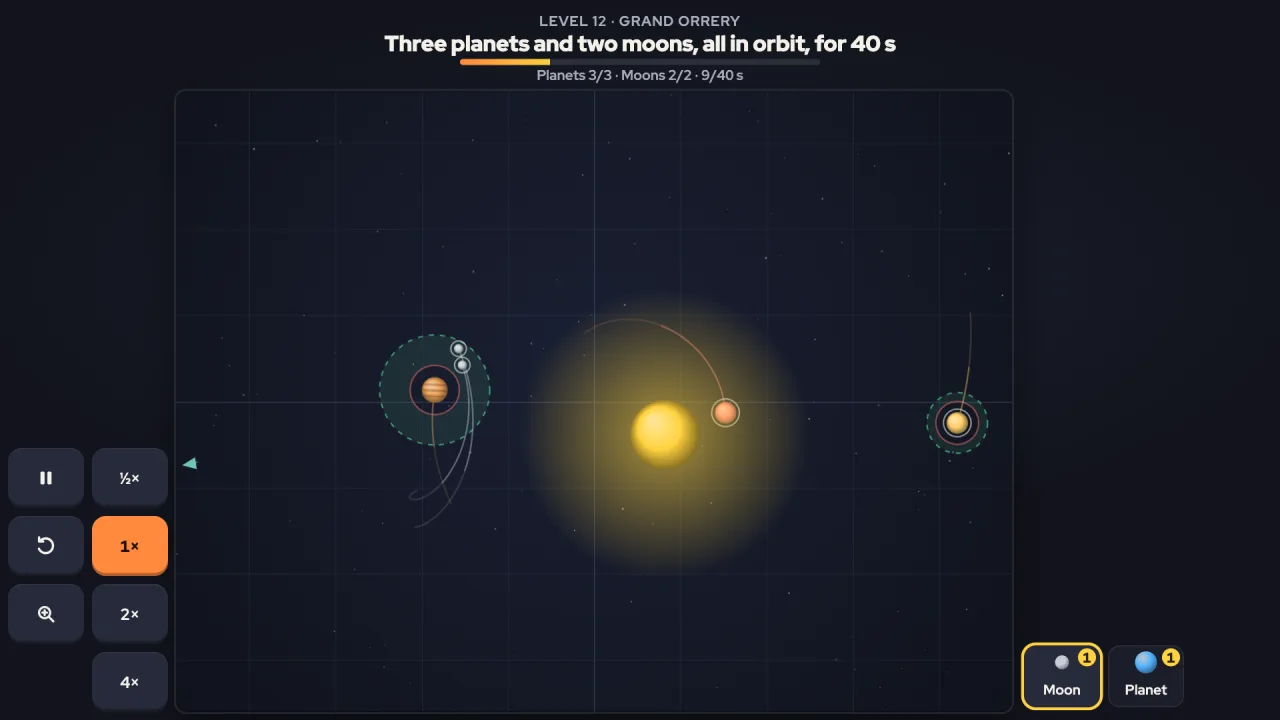
- Pick a body in the tray at the bottom (Moon, Planet, Giant, Comet), then drag back from any empty spot in the sky and let go. The body appears where you pressed and flies the opposite way, faster the farther you pulled. A dotted line shows where it will go, so you can aim an orbit before you commit, and time stands still while you aim.
- Aim sideways, not at the star. A body that is moving fast enough sideways keeps missing the star, and that is an orbit. The readout above your finger shows your speed next to the escape speed: go faster than that and the body leaves for good.
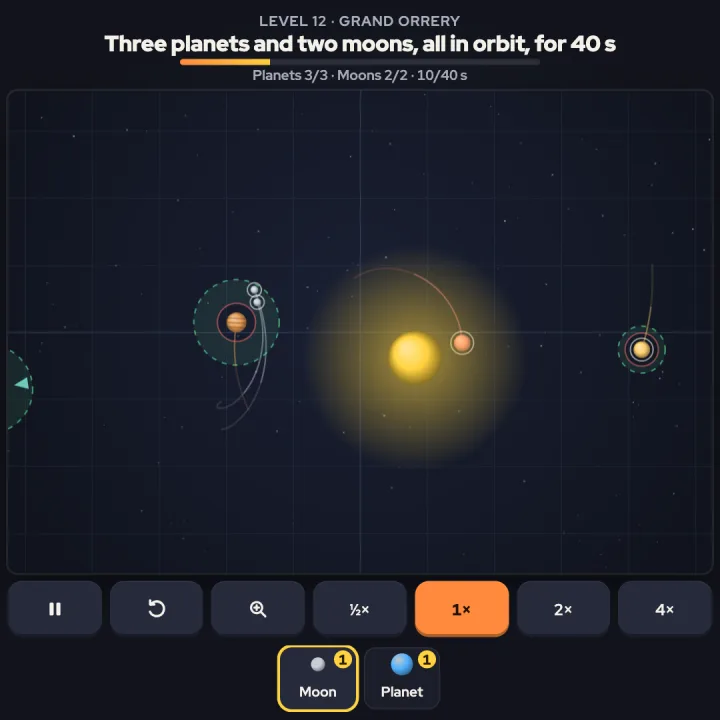
- Start inside a giant's dashed green ring and your moon inherits the giant's motion, so a circular loop on the aim line becomes a real moon orbit. The red inner ring is the Roche limit: a moon that strays that close is torn apart by tides.
- The 12 levels give a goal and a limited set of bodies: keep a planet in orbit, keep three moons for 60 seconds, send a comet past the outer ring, capture a comet, reach the beacon, or survive a rogue star. Clear a level with as few flings as the par for three stars. Speed buttons run time at half, normal, double or four times speed, and Undo takes your last fling back.
- Sandbox gives you every body, including a second star and a black hole, with up to 24 bodies in the sky. Save a system from the pause menu into one of three slots. Daily sets the same system for everyone: fling three planets and three moons and score the seconds each stays in orbit, up to 120 s per body.
- Smash is a separate mode. Throw meteors at a planet, burn it with a laser, open a black hole or set off a blast, and watch it break into chunks and dust. Every piece you break opens the next tool: Laser at 60, Black hole at 200, Blast at 450. Pinch with two fingers to zoom and pan the sky, or tap the Zoom button.
Controls
| Keyboard and mouse | Touch |
|---|---|
| MouseTouch Press, drag back and release to fling the chosen body (tap for the black hole and blast tools) | Press on the sky, drag back and let go; a dotted line shows the path |
| 1–6 Pick a body or tool from the tray | Tap a body or tool in the tray at the bottom |
| [ ] Slower or faster time | Speed buttons: half, 1x, 2x, 4x |
| CtrlZ Undo the last fling (Backspace too) | Undo button |
| +–Wheel Zoom the sky | Pinch with two fingers, drag with two to pan, or tap Zoom |
| PEsc Pause and resume | Pause button |
On a phone or tablet: Everything is one finger: press anywhere in the sky, drag back and let go. The aim line and speed readout sit above your finger, never under it, and time stands still while you aim. Pause, Undo, Zoom and the four speed buttons are 44 px+ buttons in one row above the tray, and the tray of bodies and tools sits at the bottom under your thumbs. Pinch with two fingers to zoom and pan the sky. Nothing sits in the two top corners, so the site's Back and Sound buttons stay free. It plays upright and sideways on phones (sideways, the buttons move to the left and the tray to the right) and fills the screen on a tablet.
About this game
Orbit Lab is a gravity sandbox with goals, and it is the third game of the Doodle Cub Lab series after Sand Lab. Every body pulls on every other body with real inverse-square gravity, written in plain code and stepped in fixed slices of 1/120 s, so the same flings give the same result on a 60 Hz or a 120 Hz screen. Fling a planet, moon or comet by dragging back and letting go; a dotted line previews the path on a copy of the whole system, so you can aim a stable orbit before you throw. Twelve goal levels teach one idea at a time: orbital speed, Kepler's laws, the Hill sphere and the moon ring, the Roche limit, escape velocity, capturing a comet and gravity assists, with stars for finishing in few flings. The sandbox lets you build any system with up to 24 bodies and keep three of them, and a Daily system gives everyone the same sky to stabilise. Smash mode is separate: meteors, a laser, a black hole and a shock wave break a planet into chunks that can break again and dust that fades, capped at 240 fragments from a reused pool so a mid-range phone keeps up. A one-line real-science note, from escape velocity to the event horizon, pops up where the thing happens and is kept in the Lab notes. The look is a dark lab notebook, drawn entirely in code, and your stars, notes and saved systems stay in this browser; a reload comes back paused with the sky as you left it.
Questions
Is Orbit Lab free?
Yes. It plays free in your browser on a phone, tablet or computer, with nothing to download and no sign-up. Stars, notes and saved systems stay in this browser.
Is the gravity real?
It is real inverse-square gravity between every pair of bodies, simplified: the world is flat, collisions use simple rules, and the Roche limit is one fixed distance. Kepler's laws, escape speed and gravity assists all come out of the same equations, which is why a good aim looks like a real orbit.
How do I put something in orbit?
Aim sideways, not at the star. Drag back from the sky and let go with the dotted path curving around the star without touching it. For a moon, start inside the giant's dashed green ring: the moon inherits the giant's motion, so a closed loop on the aim line is a stable orbit.
Why did my moon blow up?
It crossed the red inner ring, the Roche limit, where the planet's tides pull a moon apart. Aim for a bigger, rounder loop between the red and the green ring.
How do the stars work?
Every level has a par number of flings. Clear it in the par for three stars, one extra fling for two, and any clear for one. Each level opens when one of the two before it has a star.
What is Smash mode?
A separate mode where you break a planet apart. Throw meteors at it, then open the Laser at 60 pieces, the Black hole at 200 and the Blast at 450. Chunks can break again, and the dust fades away.
What is the Daily?
Everyone gets the same system each day. You have three planets and three moons to fling in, and your score is the total seconds your bodies stay in orbit, up to 120 s each. The best day and your streak are kept.
Can I play on my phone?
Yes, it is built for thumbs: one finger flings, the bodies and speed buttons sit at the bottom, and pinch zooms the sky. It works upright and sideways, and a reload comes back paused with the system as you left it.