Glow Doodle
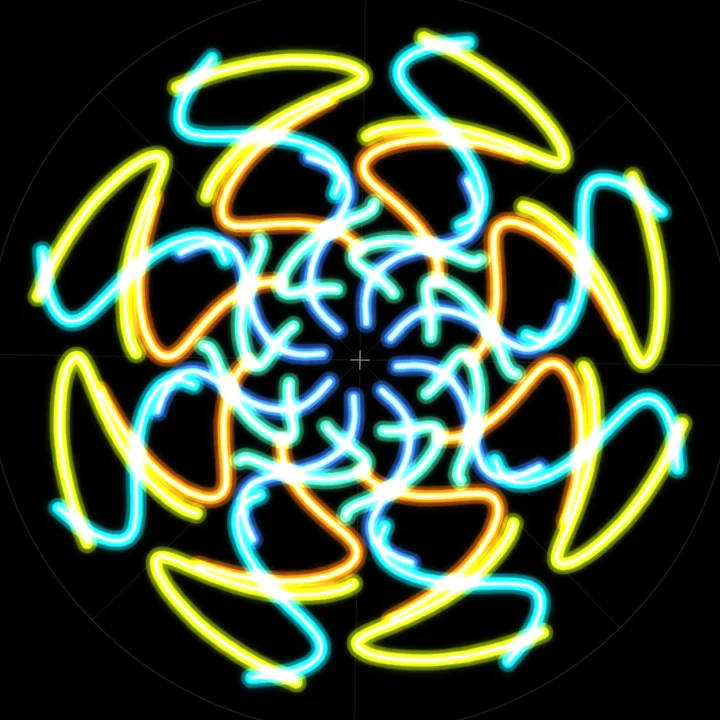
A neon kaleidoscope pad: draw one stroke and it mirrors up to 16 times in glowing light. Five brushes, palettes to unlock, a Daily glyph, 50 pattern challenges and PNG wallpaper export.
How to play Glow Doodle
- Press or touch the black circle and drag. Whatever you draw is repeated around the centre, so one stroke becomes a flower, a star or a mandala. The number beside the minus and plus buttons is how many times it repeats.
- Pick a colour from the row of eight, or turn on Rainbow so the hue turns along each stroke. Reflect adds a mirrored twin of every copy, doubling the pattern. Style opens the brush, size and palette choices.
- Undo and Redo step through your strokes, and Clear can be undone too. Save puts the picture in the gallery (12 fit in this browser) and Export makes a PNG wallpaper, 1080x1920 for a phone or 2560x1440 for a desktop.
- Challenges show a dashed glyph for a few seconds. Set the mirrors, trace one segment and press Submit before the clock runs out. Accuracy of 60, 75 and 88 percent earns one, two and three stars.
- Stars and goals unlock new palettes and brushes. The Daily is one shared glyph per day with a streak to keep.
Controls
| Keyboard and mouse | Touch |
|---|---|
| Mouse drag Draw a stroke that mirrors around the centre | Drag a finger or pen on the circle (pen pressure changes the width) |
| [] Fewer or more mirrors (1, 2, 3, 4, 6, 8, 12, 16) | Minus and plus buttons |
| 12345678 Pick a colour | Colour dots |
| R Reflect on or off | Reflect button |
| W Rainbow colour on or off | Rainbow button |
| B Brush, size and palette | Style button |
| ZY Undo and redo (Ctrl+Z and Ctrl+Shift+Z work too) | Undo and Redo buttons |
| C Clear the canvas (undo brings it back) | Clear button |
| S Save to the gallery | Save button |
| E Export a PNG | Export button |
| G Mirror guide lines on or off | Mirror guides switch in Style |
| Enter Submit a challenge, skip the glyph preview, or go to the next target | Submit button and the big button on each card |
| M Menu: Daily, Challenges, Gallery, goals | Menu button at the top |
| Esc Pause and resume | Pause button at the top |
On a phone or tablet: Every action has a button of at least 44 px: colours, mirror minus and plus, Reflect, Rainbow, Style, Undo, Redo, Clear, Save, Export and Submit sit in a dock under the circle on an upright screen, or in two side columns when held sideways. Menu and Pause are at the top, clear of the corners. Left-handed swaps the two side columns, and the pause menu sets the controls to Auto, Always or Off.
About this game
Glow Doodle is a neon kaleidoscope you play with. The canvas is pure black with a faint crosshair at the centre. Every stroke you draw is stored once and repeated around that centre, from a single copy up to 16, with an optional mirrored twin of each, so a quick squiggle turns into a lotus, a snowflake or a clock face of light. Strokes glow with a coloured halo and a hot white core, and where lines cross they brighten, the way light paint does. Five brushes change the look: Neon, Laser, Dotted beads, a three-strand Ribbon and flying Spark embers, each with its own palette of eight colours, plus a Rainbow mode that turns the hue along the stroke. Free draw is a relaxing toy with undo, redo, a gallery of twelve saved pictures kept in your browser, and PNG export as phone or desktop wallpaper. Challenges turn it into a game. A dashed glyph appears for a few seconds, dims, and you trace one segment with the right mirror count before the timer ends. Accuracy comes from how close your lines are to the glyph, with a penalty for stray ink and a bonus for finishing early. Fifty targets in five packs add one rule each: set mirrors, matching colour, a limited ink meter, a 1.5 second glimpse, and finally a hidden mirror count with two required colours. A Daily glyph gives everyone the same target, with a day streak. Stars and small goals unlock extra palettes and brushes. A reload brings your canvas back.
Questions
Is Glow Doodle free?
Yes. It is free in your browser on a phone, tablet or computer, with nothing to download and no sign-up.
How many mirrors can I use?
1, 2, 3, 4, 6, 8, 12 or 16 segments around the centre, and Reflect adds a mirrored twin of each, so the busiest pattern repeats 32 times.
How do I save or share my drawing?
Press Save to keep it in the gallery (it holds 12 and lives in this browser), or Export to make a PNG at 1080x1920 for a phone or 2560x1440 for a desktop, with an optional plain border.
How is accuracy scored in Challenges?
The game compares your strokes, mirrored the way you set them, with the glyph. The closer every part of the glyph is to your line, the higher the score. Stray ink costs points and finishing with a quarter of the time left adds 5 percent. 60, 75 and 88 percent give one, two and three stars.
How do I unlock palettes and brushes?
Stars unlock them. Synthwave opens at 15 stars, Aurora at 35, Acid at 60 and Mono at 90. Dotted opens at 20, Ribbon at 50 and Spark at 80. Stars come from challenges, the Daily and small goals such as drawing 25 strokes or saving a picture.
Is the Daily the same for everyone?
Yes. Each UTC day has one glyph, with the same mirrors and colour rule for every player. Your best accuracy for the day is kept and finishing it on consecutive days builds a streak.
What happens if I reload the page?
Your canvas comes back in the same tab, and a challenge in progress returns paused. Progress, the gallery and settings are saved in this browser.