Mini Golf Crayon
Pull back and putt through 27 holes with windmills, ramps, water and sand. Draw your own course and share it by code, play 2 to 4 on one screen, and chase the Daily hole.
How to play Mini Golf Crayon
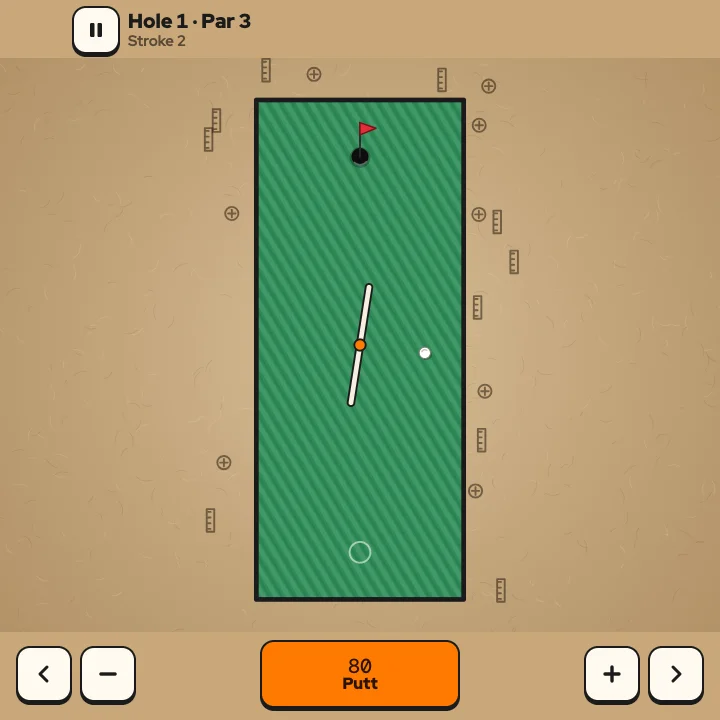
- Drag back from anywhere on the course, like a slingshot, and let go to putt. The dashed line shows where the ball will go and the three dots show the power. Pull less than a thumb-width and nothing happens, so you can cancel.
- Get the ball in the hole in as few strokes as you can. Each hole has a par from 2 to 5: one under is a Birdie, two under an Eagle, and one stroke is an Ace. After 8 strokes the hole scores 8 and you move on.
- Sand slows the ball, water costs one stroke and puts the ball back where you hit it from, slopes push it along their arrows, orange boosters speed it up, and windmills and sliding bars knock it away, so time your shot.
- Finish a hole under par to collect its coin. Coins unlock new ball looks, and ten coins open the boosters and sliding bars in the course maker.
- Playing with friends? Pick 2 to 4 players on the menu and pass the phone: everyone putts each hole in turn, and the lowest total wins.
Controls
| Keyboard and mouse | Touch |
|---|---|
| Mouse drag Drag back from anywhere and release to putt | Drag back from anywhere with one finger, then lift to putt |
| ←→ Aim in small steps (hold Shift for finer steps) | Aim buttons beside Putt |
| ↑↓ More or less power | Plus and minus buttons beside Putt |
| Space Putt | The Putt button at the bottom |
| PEsc Pause and resume | Pause button at the top |
| Enter Play, next hole or play again | The big button on each card |
| U Undo in the course maker | Undo tool in the course maker |
| M Sound on or off | Sound button in the pause menu |
On a phone or tablet: Drag back from anywhere on the course and lift your finger to putt; the aim guide sits on the ball so your finger never covers it, and drags that start at the screen edge are ignored. The buttons at the bottom aim in small steps, change the power and putt, with Pause at the top. Left-handed swaps the sides in landscape; the pause menu sets the controls to Auto, Always or Off.
About this game
Mini Golf Crayon is a top-down mini golf game drawn in thick marker on kraft paper. Pull back like a slingshot, let go, and sink the ball in as few strokes as you can. Three nine-hole courses build up the hazards: Backyard has open fairways and fence posts, Rooftop adds sand, water and gaps barely wider than the ball, and Workshop brings windmills, sliding bars, boosters and slopes. Every hole has a hole in one that is really there, so a perfect shot is always possible, and a coin waits on each hole you beat par. The Daily is one fresh hole for everybody, the same for every player that day, with a streak to keep, and Quick gives you a new random hole every time. The course maker lets you draw walls, sand, water and ramps with a finger, test each hole yourself so it is proven playable, then share the whole course as a short code that a friend can paste into their game. Up to four people can share one screen, taking turns on every hole while the scorecard tallies Birdies, Eagles and Aces. Your best scores, coins and ball looks are kept in your browser, and a reload brings your round back paused. The aim guide is built for thumbs: it sits on the ball, so your finger never hides the shot, and you can fine-tune the angle and power with the buttons at the bottom when a gap is tight. The ball runs on a fixed-step physics loop, so a bank shot that works at 60 frames a second works exactly the same on a 120 Hz screen. Unlock Rooftop by finishing Backyard three under par and Workshop by finishing Rooftop five under par, collect coins for four ball looks, and come back every day to keep your Daily streak alive.
Questions
Is Mini Golf Crayon free?
Yes. It is free to play in your browser on a phone, tablet or computer, with nothing to download and no sign-up.
How do I aim and putt on a phone?
Drag back from anywhere on the course and lift your finger. The farther you pull, the harder the putt; a short pull cancels. You can also use the aim, power and Putt buttons at the bottom.
What happens when I hit the water?
You add one stroke and the ball goes back to the spot you last hit it from. After 8 strokes the hole scores 8 and the next one starts.
How do I unlock Rooftop and Workshop?
Finish Backyard 3 under par (21 strokes or fewer) to open Rooftop, then finish Rooftop 5 under par (27 strokes or fewer) to open Workshop.
How do I make and share my own course?
Open Mine, then New course, and draw with your finger. Test each hole by putting it in yourself, then Save. Share code gives you a short code that anyone can paste under Mine, Import.
Can I play with friends on one device?
Yes. Choose 2, 3 or 4 players on the menu and pass the device: everyone putts each hole in turn and the lowest total wins.
What happens if I reload the page?
Your round comes back paused in the same tab, with the ball where it was. Best scores, coins, courses and settings are saved in this browser.