Doodle Parking
Park the car inside the box without a scrape. 60 levels on 6 floors with cones, moving traffic, gates, narrow ramps and a trailer, five cars, a route you can draw first and a Daily car park for everyone.
How to play Doodle Parking
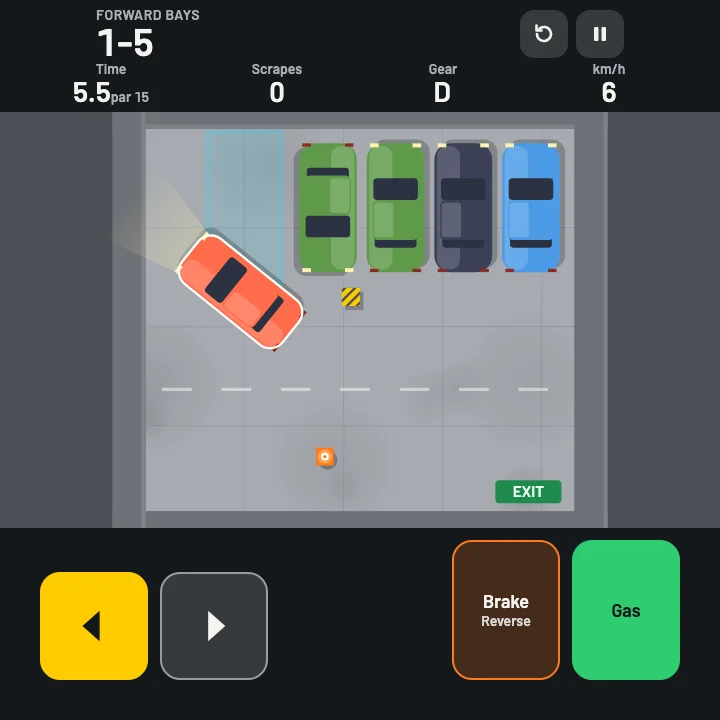
- Drive with the two thumbs: arrows on the left steer, Gas and Brake on the right. Hold Gas to go forward. Hold Brake to stop, and keep holding it once you are stopped to reverse.
- Stop completely inside the glowing box, with the car lined up within 6 degrees. A ring fills around the box while you hold still; after one second you are parked. The box turns green when the car is inside and lined up.
- Touching anything under about 8 km/h is a scrape and costs stars. Touching it faster is a crash and the try ends. The car slows by itself near the box so you can creep in.
- Three stars means no scrapes and under the par time. Two stars means at most one scrape and under one and a half times par. One star is any clean stop in the box. Waiting for a gate or for traffic counts on the clock.
- Before you drive you can tap Draw route and drag a chalk line across the floor for the way you plan to go. It does not steer for you. Keep within 0.6 m of it for 90 percent of the drive to earn Called it.
- Eighteen stars on a floor open the next one. Total stars unlock cars: Pickup at 40, Van at 80, Coupe at 120 and Stretch at 150. Every level is sized to the car you drive.
Controls
| Keyboard and mouse | Touch |
|---|---|
| W↑ Gas | Hold the Gas pedal |
| S↓Space Brake, then reverse when stopped | Hold the Brake pedal |
| AD←→ Steer | Left and Right arrows, or the slide strip from Settings |
| R Retry the level | Retry button at the top |
| PEsc Pause and resume | Pause button at the top |
| M Sound on or off | Sound in the pause menu |
| Enter Play, Next or Resume | The big button on each card |
On a phone or tablet: Two thumbs, upright: the steering arrows sit in the lower left corner and Gas and Brake in the lower right, in the area your thumbs rest on. Retry and Pause are at the top, away from the corners. Settings swaps the arrows for a slide strip, and Left-handed mirrors the two sides. Draw route is a drag on the floor before you start. The pause menu sets the controls to Auto, Always or Off.
About this game
Doodle Parking is a precision parking puzzle played upright on your phone. You see the whole car park from above, one level at a time, and the job is simple to say and hard to do: stop the car inside the glowing box, lined up and still, without touching anything. Sixty levels run across six floors, and each floor adds one new problem. Floor 1 is forward bays with room to spare. Floor 2 asks you to back in with the nose out. Floor 3 is parallel parking between two cars, with a gap that shrinks level by level. Floor 4 adds a gate that opens and shuts on a timer and traffic that crosses the lane. Floor 5 is a chicane of narrow ramps, and floor 6 hitches a trailer to the car and asks you to reverse the whole rig into a dock. Every level is rated up to three stars. A scrape costs a star, a crash ends the try, and a par time sets the line for the third. The Doodle Cub twist is the chalk route: before you start you can drag a line across the floor for the way you plan to go, and at the end the game tells you how closely you kept to it. Five cars unlock as your stars add up, from the easy Hatch to the long, wide-turning Van and the Stretch, and every level is rebuilt to fit the one you drive. A Daily car park, the same for everyone, keeps a streak. Controls are built for two thumbs, with steering on the left and the pedals on the right, a slide strip if you prefer it, and a left-handed switch. Your stars, best times and a run in progress are saved on your device.
Questions
Is Doodle Parking free?
Yes. It is free to play in your browser on a phone, tablet or computer, with nothing to download and no sign-up.
How do I reverse?
Hold the Brake pedal. While the car is moving forward it brakes, and once it has stopped, keeping the pedal held puts it in reverse. The gear letter at the top shows D for drive or R for reverse. On a keyboard use S or the down arrow.
What is the difference between a scrape and a crash?
Touching a wall, car, cone or pillar at under about 8 km/h is a scrape: the number at the top goes up and you can still earn two stars with one scrape. Touching at more than 8 km/h is a crash and the try ends at once, so ease off the gas near things.
How do I get three stars?
Park with no scrapes in less than the par time shown next to your timer. The timer starts at your first touch of Gas or Brake, and waiting for a gate or for traffic counts.
What does Draw route do?
Before you start, tap Draw route and drag a line across the floor for your plan. It is only a guide in chalk and never steers the car. After you park, the result card shows how much of your drive stayed within 0.6 metres of it, and 90 percent or more earns the Called it badge.
How do I open the next floor and the other cars?
Get 18 stars on a floor to open the next one. Cars unlock from your total stars: Pickup at 40, Van at 80, Coupe at 120 and Stretch at 150. The Daily always uses the Hatch so everyone plays the same puzzle.
Can I play it with a keyboard?
Yes. W or the up arrow is Gas, S or the down arrow is Brake and reverse, A and D or the left and right arrows steer, R retries and P pauses. The on-screen pedals and arrows work with a mouse too.