Jigsaw Doodle
A calm jigsaw table with 18 crayon-and-pastel pictures, 16 to 300 pieces, a piece tray, an edge-only filter, pinch zoom on phones and a Daily puzzle with a streak.
How to play Jigsaw Doodle
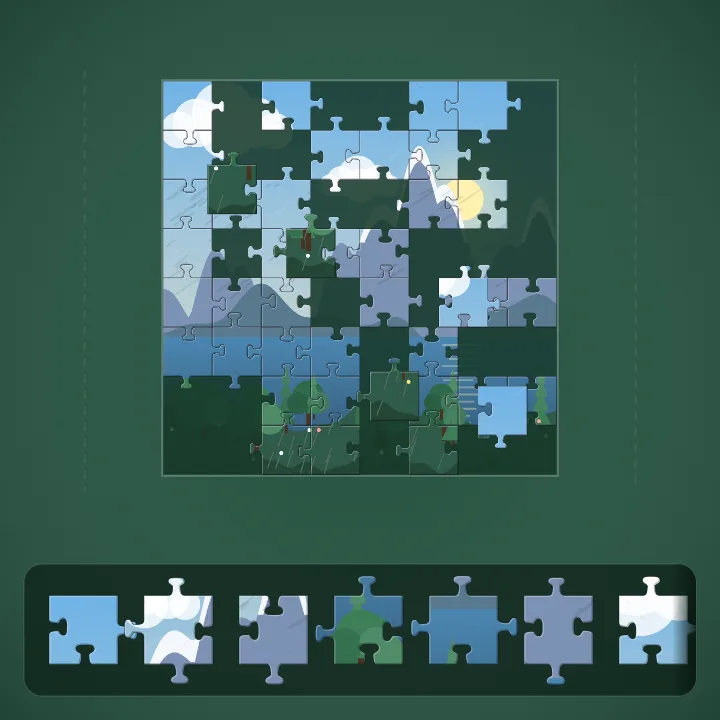
- Pick a picture and a piece count from 16 to 300. All the pieces start in the tray at the bottom of the screen (on the right when the screen is wide).
- Drag a piece up from the tray onto the table, or tap it to drop it in the middle of the view. Put it on its place in the picture and it snaps in and stays there.
- Two pieces that belong side by side snap together wherever you leave them on the table, and from then on they move as one group. Build islands of the picture, then join them.
- On a phone, drag the empty felt with one finger to move around, pinch to zoom, and use the plus, minus and fit buttons if you prefer. The edge button shows only the border pieces in the tray, so you can build the frame first.
- Finish the picture to see your time against par. Faster than par, a bigger piece count and the Daily puzzle earn frames, a day streak and new collections.
Controls
| Keyboard and mouse | Touch |
|---|---|
| Mouse drag Move a piece, or the whole group it is joined to | Drag a piece with one finger |
| Drag feltScrollArrows Move around the table and zoom in or out | Drag empty felt to pan, pinch to zoom, or use the plus, minus and fit buttons |
| Click Drop a tray piece in the middle of the view | Tap a piece in the tray |
| E Show only edge pieces in the tray | Edges button |
| V Show the finished picture | Eye button |
| +-0 Zoom in, zoom out, fit the picture | Plus, minus and fit buttons |
| PEsc Pause and resume | Pause button |
| M Sound on or off | Sound in the pause menu |
On a phone or tablet: Play upright or sideways. Drag a piece up out of the tray at the bottom (or out to the left from the tray on the right when the screen is wide), or just tap it to put it on the table. Drag empty felt with one finger to move around and pinch with two to zoom; the plus, minus and fit buttons do the same. The Edges button filters the tray to border pieces and the eye shows the picture. Every piece is at least 44 px wide at the working zoom. Pause is in the toolbar; the pause menu sets the on-screen controls to Auto, Always or Off.
About this game
Jigsaw Doodle is a quiet online jigsaw for people who like to sit with a puzzle for ten minutes or an hour. It has 18 pictures drawn from scratch in code in a crayon-and-pastel style: dusk avenues and rainy streets, alpine lakes and desert roads, and six bold patterns, from rainbow scales to deep bubbles. Pieces are cut with proper Bézier tabs, so every piece fits only where it belongs. Choose 16, 36, 64, 100, 150, 225 or 300 pieces. The pieces wait in a tray; pull them onto a green felt table, snap neighbours together into groups, and move a whole island at once. An Edges filter shows only the border pieces so you can build the frame first, a faint guide image sits under the board if you want it, and the eye button shows the finished picture whenever you are stuck. On a phone the table pans with one finger and zooms with a pinch, and the tray sits where your thumb is. Every piece you grab is at least 44 pixels wide at the working zoom, and drags that start at the very edge of the screen are left to your phone's own gestures. Each finish records your best time against a par time for that piece count, and the picture earns a bronze, silver or gold frame as you move up to bigger puzzles. Landscapes open after three finished puzzles and Patterns after six. The Daily gives everyone the same picture and the same cut at 64 pieces, with a day streak to keep. Your table is saved as you go and a reload brings it back paused. It is free, there is nothing to download and there is no sign-up.
Questions
Is Jigsaw Doodle free?
Yes. It is a free jigsaw puzzle game that runs in your browser on a phone, tablet or computer, with nothing to download and no sign-up.
How many pieces can I play?
Seven sizes: 16, 36, 64, 100, 150, 225 and 300 pieces. On a phone the board pans and zooms so even 300 pieces stay comfortable to grab.
How do I find the edge pieces?
Press the Edges button (or E) and the tray shows only border pieces. Build the frame first, then switch the filter off to find the rest.
How does the Daily puzzle work?
Each day has one picture at 64 pieces, cut the same way for every player. Finish it to extend your day streak; a missed day starts the streak again.
What are the frames and how do I open the other collections?
Finishing a picture gives it a frame: bronze for small puzzles, silver from 64 pieces and gold from 100. Landscapes open after you finish 3 puzzles and Patterns after 6.
Will I lose my puzzle if I reload the page?
No. Your table, the timer and every piece are saved as you play, and a reload in the same tab brings the puzzle back paused. Best times, frames and the Daily streak are saved in this browser.
Can I zoom in on a phone?
Yes. Pinch with two fingers, or use the plus and minus buttons, and drag the empty felt with one finger to move around the table.