Space Explorer
Draw your own ship, pick a mission and fly it with short burns: 20 gravity-assist missions from low Earth orbit to the Moon, Mars, the asteroid belt, Jupiter's moons and Pluto's companion Charon. A live dashed path shows where you will drift, turns amber inside a planet's pull and red where you would crash, and the fuel you have left decides your stars. Every arrival adds a real-facts log card.
How to play Space Explorer
- Open the Hangar to draw your hull: sketch one half on the pad and the other half mirrors it. The area of the drawing sets the ship's mass, so a bigger hull carries more fuel but turns and accelerates more slowly. Dart, Cruiser and Hauler are ready-made starting points.
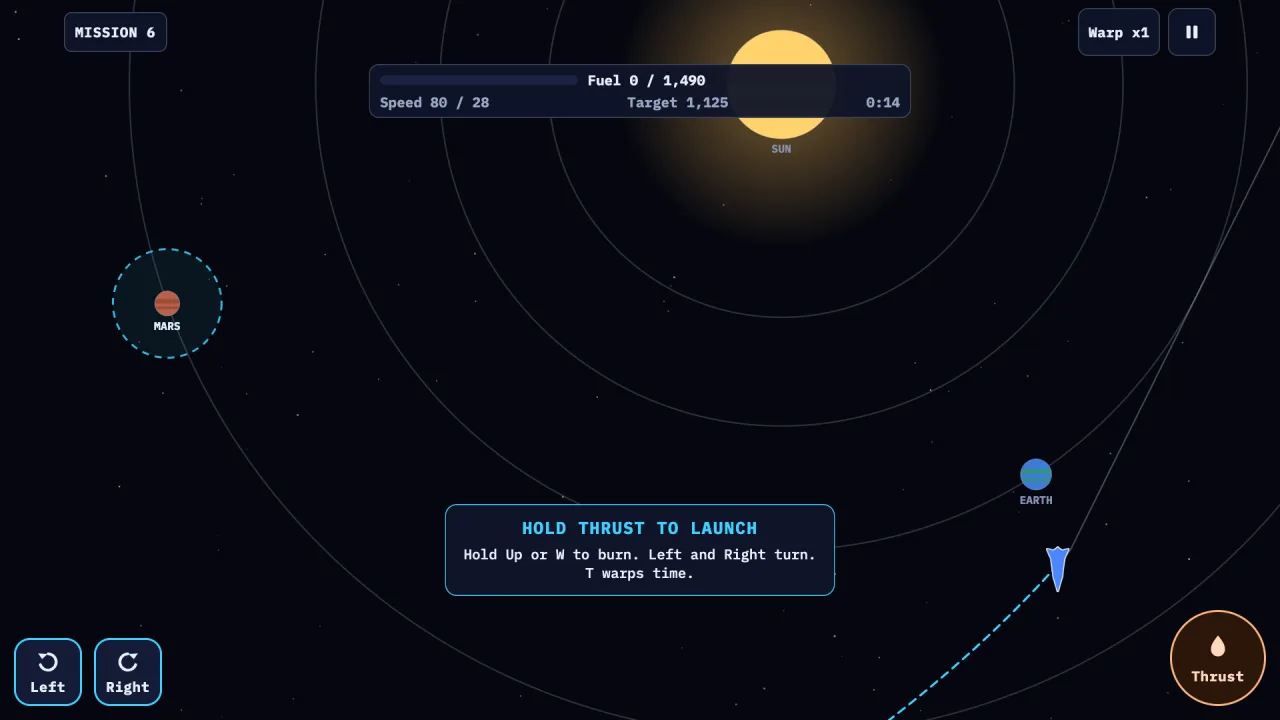
- Pick a mission on the map and read the briefing: the target ring, the fuel the mission gives you and the speed limit for arriving. Play opens the flight with the clock paused, so you can turn the nose and study the dashed path before anything moves.
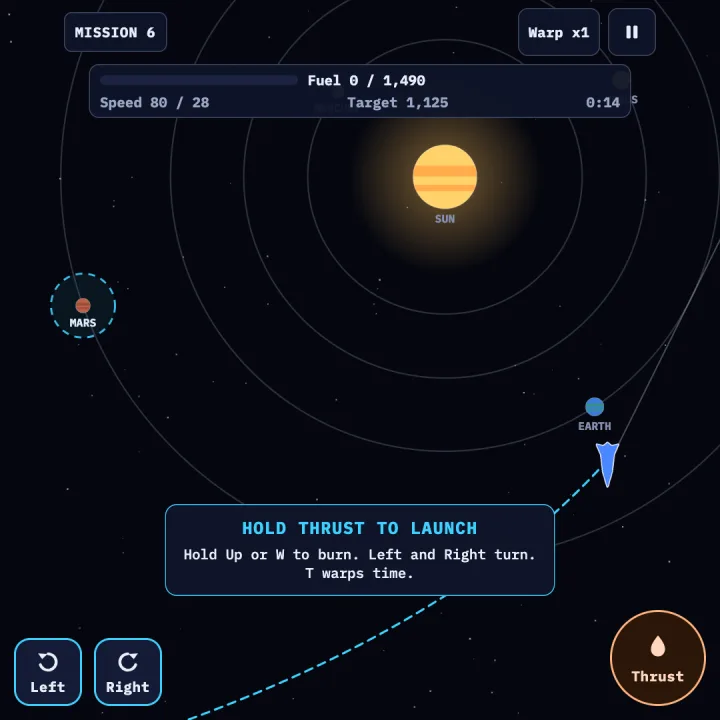
- Hold Thrust to burn. Every second of burn adds speed in the direction the nose points and spends fuel; let go and you coast. Left and Right turn the nose. The dashed line always shows where you will drift if you stop burning now.
- Read the path: cyan is clear, amber means you are inside a planet or moon's pull, red means the path ends in a crash. Bend it with short burns until it meets the dashed target ring.
- Arrive inside the ring with your speed relative to the target under the limit shown in the readout, for example Speed 28 / 30. Too fast and the ring turns red and nothing counts: turn the nose against your motion (the amber marker shows that direction) and burn to slow down.
- Time warp (x2, x4) skips the long coasts and drops back to x1 the moment you burn. If a burn goes wrong, Pause then Undo burn takes you back to just before it.
- Pass within three radii of a body and leave faster than you came and it is an assist: Assist +x shows the speed gained. Burning inside the pull cancels the credit.
- Stars come from the fuel left when you arrive: one star for arriving, two with 8% of the mission's fuel left, three with 20%. Stars open sectors (8, 20, 32 and 44 stars) and hull paints (10, 25 and 45). Run out of fuel with no way to the ring and the mission is lost.
- Every first arrival at a planet or moon adds a log card with three real facts. Expert mode in the pause menu shortens the path line to 12 seconds.
Controls
| Keyboard and mouse | Touch |
|---|---|
| LeftRight Rotate the nose (also A and D) | Left and Right buttons at the lower left |
| Up Thrust: hold to burn (also W or Space) | Thrust button at the lower right, hold it |
| T Time warp x1, x2, x4 | Warp button at the top |
| PEsc Pause and resume | Pause button at the top |
| R Undo the last burn | Undo burn in the pause menu or on the result card |
| Enter Play the selected mission, resume, retry or next | The Play, Resume, Retry and Next buttons |
| M Sound on or off | Sound in the map and pause menus |
On a phone or tablet: Three big buttons at the lower corners are the whole flight: Left and Right (rotate) together at the lower left, Thrust (hold) at the lower right, each 56 px or more and usable at the same time with two fingers. Time warp and Pause sit at the top, clear of both top corners so the site's Back button keeps its place. Works upright and sideways; left-handed swaps the sides in the pause menu.
About this game
Space Explorer is a gravity-assist flight game for players who like a puzzle with real orbital mechanics and a bit of nerve. You draw your own ship on a mirrored pad, and its area becomes its mass: a light Dart turns quickly and sips fuel, a heavy Hauler carries far more but swings its nose slowly and accelerates weakly. Then you pick one of 20 missions in five stylised systems and fly it by hand. Everything runs on a fixed 120 Hz physics step, so a burn does the same thing on a 60 Hz phone and a 120 Hz iPad. Gravity from every planet and moon pulls on the ship, the moons keep to Kepler orbits, and the dashed line always shows the coast from where you are, so you can bend it with a short burn and watch it change before you commit. The line turns amber inside a body's pull and red where it ends in a crash. The sectors teach one thing each: a single burn from low Earth orbit to the Moon; transfers to Venus, Mars and hot, deep Mercury; a belt of 14 to 24 moving asteroids with Ceres, Vesta and Pallas as targets; Jupiter's four big moons from a high orbit; and the far worlds of Saturn, Neptune and Pluto, where the ring is tight and the limit is 18 to 22. Arrive in the dashed ring under the speed limit with fuel to spare: one star for arriving, two with 8% left, three with 20%. Stars open the next sectors and new hull paints, every first arrival adds a log card with three real facts, passing close to a planet and leaving faster counts as a slingshot assist, and Pause then Undo burn rewinds one mistake. Every mission is proven completable by a scripted burn plan that the game's own tests replay through the same physics step. Progress, your hull and your stars stay in this browser, and a reload resumes the flight paused.
Questions
Is Space Explorer free?
Yes. It plays free in your browser on a computer, tablet or phone, with nothing to download and no sign-up. Your hull, stars and log cards stay in this browser.
Can I play it on my phone?
Yes, it is built for thumbs first. Rotate Left and Right and a big Thrust button sit at the lower corners, Time warp and Pause at the top, and it works upright and sideways. A reload resumes your flight paused.
How does the hull I draw change the ship?
The area of your drawing sets the mass between 0.6 and 1.8. A bigger hull carries more fuel but turns and accelerates more slowly; a smaller one is quick and light but its tank may be too small for the long missions, and the briefing warns you when it is.
What does the dashed line show?
Where the ship will go if you stop burning now: 30 seconds ahead, or 12 in Expert mode. It is cyan when clear, amber inside a planet or moon's pull and red where it ends in a crash.
Why did my arrival not count?
The ring only counts when your speed relative to the target is under the limit in the readout (for example 28 / 30). Inside the ring but too fast, the ring turns red: turn the nose against your motion and burn to slow down.
How are stars earned?
From the fuel left when you arrive: one star for arriving, two with 8% of the mission's fuel left and three with 20%. Every mission's gold is proven reachable by a dev plan that the game tests replay.
What is an assist?
Passing within three radii of a planet or moon and leaving faster than you came, without burning inside its pull. The banner shows Assist plus the speed gained and every assist adds to your total.
I burned too early. Can I undo it?
Yes. Pause and choose Undo burn, or press R: the flight goes back to just before your last burn. After a crash or a lost ship, Retry burn on the result card does the same.