Sky Hopper
An endless bounce-up climb: your hopper jumps on its own, you steer onto platforms, past moving and crumbling ones, springs, rockets and drones, from the rooftops to orbit. Draw an ink platform to save a fall.
How to play Sky Hopper
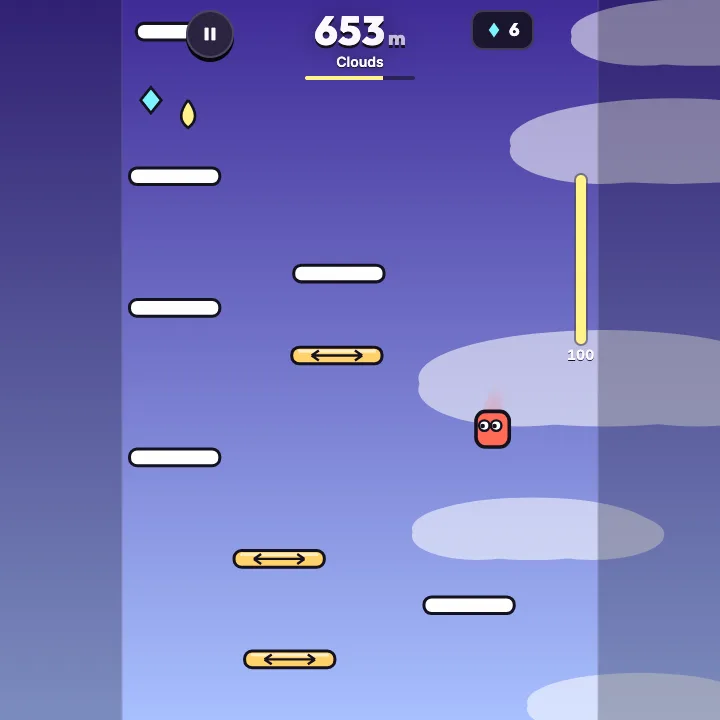
- Your hopper bounces by itself. Hold the left or right button (or the left or right half of the lower screen) to steer it onto the platform above. You land only when you are coming down, so you can rise straight through a platform from below.
- Every metre you climb counts. A dashed yellow line marks your best height, and the sky changes as you rise: Rooftops, Clouds, Jet stream, Stratosphere and Orbit.
- White platforms are safe. Yellow ones slide sideways, red ones crumble after one bounce, and a green spring launches you more than twice as high. A rocket pickup lifts you straight up for three seconds.
- Grab shards to unlock hoppers, and ink drops to refill the ink meter. When a jump goes wrong, tap the ink button to draw a glowing platform under you for two seconds. It costs 30 ink and breaks your chain.
- Land on five new, higher platforms in a row without using ink for a Chain: +10 m and +10 ink. From the Stratosphere, drones knock you sideways, but you can bounce on top of one to crush it.
Controls
| Keyboard and mouse | Touch |
|---|---|
| ←→AD Steer the hopper left or right | Hold the left or right button, or the left or right half of the lower screen |
| Space↑ Draw an ink platform under the hopper (30 ink) | Ink button in the middle, or tap the top of the screen |
| PEsc Pause and resume | Pause button at the top |
| Enter Hop again on the result card | The big Hop again button |
| Tilt Steer by tilting the phone (optional) | Tilt switch in the pause menu |
On a phone or tablet: Hold the left or right button at the bottom corners with your thumbs, or just hold the left or right half of the lower screen, to steer. The Ink button in the middle draws a platform, and tapping the top of the screen does the same when the on-screen buttons are off. Tilt steering is an optional switch in the pause menu. Left-handed swaps the two steering buttons, and the pause menu sets the controls to Auto, Always or Off. Upright is the native layout; on a tablet or computer the play column is centred.
About this game
Sky Hopper is an endless upright jumper for your phone, tablet or computer. Your hopper bounces on its own, so the whole game is one skill: steer it onto the next platform and keep climbing. The score is your height in metres, with a dashed line showing your best so you always have a number to beat. The climb runs through five layers. Rooftops start with steady platforms at dusk. In the Clouds the platforms begin to slide, the Jet stream adds crumbling platforms and a side wind, the Stratosphere sends drones that knock you sideways unless you land on top of them, and in Orbit gravity drops and the platforms shrink. Every layer is built from a seeded generator that checks each gap can be reached, so a fall is always your own. You carry an ink meter: tap the ink button to draw a glowing platform under you for two seconds, and refill the meter from ink drops on the way up. Springs, rocket pickups and chains of five clean landings reward good lines. Shards you collect buy the Bolt hopper, while Ring, Comet and Orbit unlock when you reach 500, 1,200 and 2,500 metres. A Daily climb gives every player the same seed for the day, with a streak to keep, and a reload brings your run back paused. The look is our own: a bold dusk-to-space sky that changes colour with every layer, clean white platforms with an ink outline, and hoppers made of simple shapes with a short trail. Runs are quick, a restart takes one tap, and the pause menu keeps a sound switch, optional tilt steering and the on-screen control settings, so it is easy to play one handed in a queue or on a big screen at home.
Questions
Is Sky Hopper free?
Yes. It is free to play in your browser on a phone, tablet or computer, with nothing to download and no sign-up.
How do I steer on a phone?
Hold the left or right button at the bottom corners, or hold the left or right half of the lower screen. You can also turn on Tilt in the pause menu and steer by tilting the phone.
What does the ink button do?
It draws a glowing platform under your hopper for two seconds. It costs 30 of your 100 ink and ends your chain, so use it to save a fall. Ink drops on the way up refill the meter.
What is a Chain?
Landing on five new, higher platforms in a row without using ink. It gives +10 m to your height and +10 ink.
How do I unlock more hoppers?
Ring unlocks at a best height of 500 m, Comet at 1,200 m and Orbit at 2,500 m. Bolt costs 200 shards, which you collect while climbing. Every hopper plays the same; each has its own look and trail.
Is the Daily climb the same for everyone?
Yes. Each day has one seed, so every player climbs the same platforms in the same order. Your best for each day and your day streak are kept in this browser.
What happens if I reload the page?
Your run comes back paused in the same tab, with the same platforms, your ink and your chain. Bests, shards and unlocked hoppers are saved in this browser.