Doodle Ships
Hide your fleet, then sink the enemy's before it sinks yours. Five admirals from random to probability-hunting, 2 players on one phone, power shots and a Daily fleet.
How to play Doodle Ships
- Place your five ships on the 8 x 8 sea. Tap a ship to pick it, tap a square to move it there, tap the picked ship again to turn it, or drag it. Press Auto for a random fleet. Ships may not touch unless you switch that rule on in the menu.
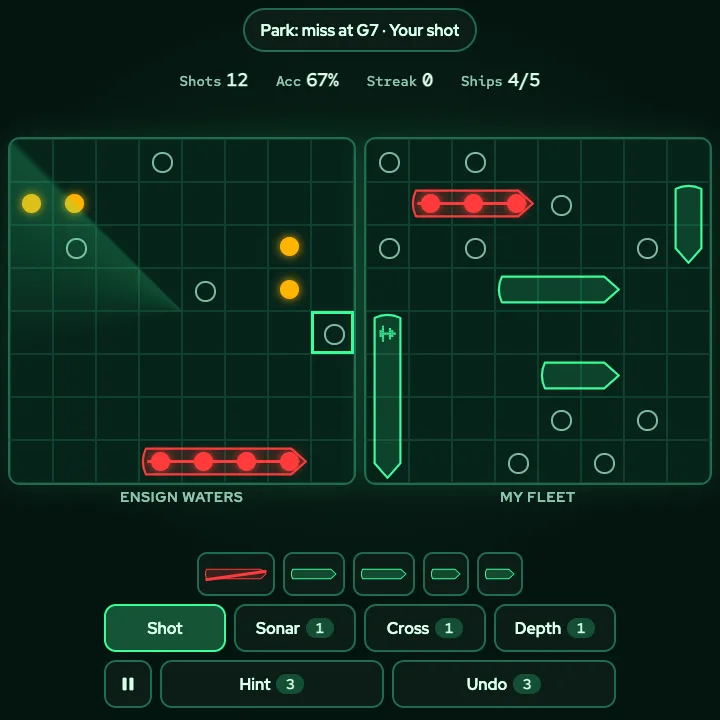
- Press Battle! Then tap a square on the enemy waters to fire. A ring is a miss, an amber dot is a hit, and a ship that is hit on every square is sunk and drawn in red.
- You and the admiral take turns, one shot each. The first side to sink the whole enemy fleet wins.
- Beat an admiral to unlock the next, and climb the rating ladder from Deckhand to Fleet Admiral. Wins also unlock power shots (Sonar, Cross, Depth charge) and board themes.
- On a phone one sea shows at a time: switch between Enemy waters and My fleet with the buttons above the board. On a tablet both seas show side by side.
Controls
| Keyboard and mouse | Touch |
|---|---|
| ClickEnter Fire at a square (move the cursor with the arrow keys) | Tap a square on the enemy waters |
| R Turn the picked ship while placing | Tap the picked ship again, or the Rotate button |
| A Auto place your fleet | Auto button |
| B Start the battle once your fleet is placed | Battle! button |
| SCD Arm Sonar ping, Cross shot or Depth charge (after you unlock them), then pick the square and fire | Weapon buttons above the dock, then tap a square twice |
| H Hint: the square most likely to hold a ship | Hint button |
| U Undo your last shot and the reply | Undo button |
| V Switch between Enemy waters and My fleet | Enemy waters / My fleet buttons |
| PEsc Pause and resume | Pause button |
| M Sound on or off | Sound in the pause menu |
On a phone or tablet: Everything is a button or a tap. Tap a square to fire; tap a ship to pick it and tap it again to turn it, or drag it where you want it. The Dock at the bottom holds Pause, Hint, Undo and the weapons; Rotate, Auto and Battle! appear while you place. Powers take two taps: the first shows the area, the second fires. Left-handed mirrors the dock, and the pause menu sets the on-screen controls to Auto, Always or Off.
About this game
Doodle Ships is a sea battle game you can play alone against the computer or with a friend on one phone. Each side hides a fleet of five ships on an 8 x 8 grid: a Carrier of four squares, a Cruiser and a Submarine of three, and a Destroyer and a Patrol boat of two. You cannot see the other fleet. You call a square, the other side answers miss, hit or sunk, and you take turns until one fleet is gone. The sea is a green sonar screen in a dark ops room, with a slow sweep on the enemy waters, a hollow ring for a miss, an amber dot for a hit and a red outline when a ship goes down. Because the grid is 8 x 8, every square is big enough for a thumb, even on a small phone. Placing your fleet is quick: Auto gives a random layout in one tap, or you can tap a ship, tap its new square and tap it again to turn it. Five admirals wait on the ladder. Cadet Moss fires at random. Ensign Park hunts on a checkerboard and probes around a hit. Captain Voss follows a line of hits to both ends. Commodore Reyes works out where the remaining ships can still fit and fires at the likeliest square every turn. Admiral Okafor adds a habit: it leans on squares where you hid ships in your last ten games, so mix up your fleet. Each win opens the next admiral and moves your rating up the ladder, from Deckhand to Fleet Admiral. Wins also unlock power shots: a Sonar ping that tells you whether a ship is within a 3 x 3 area, a Cross shot that fires five squares, and a Depth charge that fires a 2 x 2 block. Each can be used once per battle, and using none earns the Silent badge. Hints and a few undos are there if you get stuck. Two players can share one phone: each places a fleet in secret, and a hide screen covers the sea between turns so nobody peeks. The Daily is one hidden fleet for everyone today; sink it in as few shots as you can. Reload the page and your battle comes back paused. The game is free and runs in your browser.
Questions
Is Doodle Ships free?
Yes. It is free to play in your browser on a phone, tablet or computer, with nothing to download and no sign-up.
Why is the sea 8 x 8?
So every square is at least 44 pixels wide on a small phone and a finger never hits the wrong one. The fleet is five ships of 4, 3, 3, 2 and 2 squares.
How do the computer admirals differ?
Cadet fires at random, Ensign hunts on a checkerboard, Captain follows lines of hits, Commodore calculates where the remaining ships can fit, and Admiral adds a habit of favouring squares where you placed ships in your recent games. None of them can see your fleet.
How do I play with a friend on one phone?
Choose 2 players, place a fleet for each player in secret, and pass the phone when the game says so. A hide screen covers the sea between turns.
What are power shots and how do I unlock them?
Sonar ping unlocks after your first win, Cross shot after 3 wins and Depth charge after 6. Each can be used once per battle against the computer. They are off in 2 players and the Daily so those stay fair.
What is the Daily fleet?
One hidden fleet, the same for every player on a given day. There is no return fire: sink it in as few shots as you can. Your fewest shots and your day streak are kept.
What happens if I reload the page?
Your battle comes back in the same tab, paused, with every shot where you left it. Your rating, wins, themes and insignia are saved in this browser.